Introducing ClimMob
Sofía Acuña, Marilyn Manrow, Brandon Madriz, Kauê de Sousa
ClimMob: A software platform for experimental citizen science in agriculture
ClimMob supports tricot trial implementers in evaluating technology options across diverse contexts with a one-platform solution to design, manage, and share experiments. It helps implementers plan and monitor processes while ensuring that relevant outputs reach researchers, field agents, and trial participants at the right time. This enables effective trial operations and agile, data-based decisions, underpinned by an excellent user experience.
ClimMob is a free, open-source, online platform for participatory testing projects. It guides users through all stages of their tricot projects: from project design and generation of randomized test packages, to efficient data collection, automated analysis, and reporting.
- Current version: ClimMob 3
- Data collection: can be conducted using the Android app ODK Collect, through online forms (Enketo), or by uploading data via Excel templates
- Analysis: uses many R packages
Requirements: A computer with an internet connection to design the trial and an Android smartphone or tablet for field data collection
Why ClimMob?
Participatory testing in agriculture can be complex, involving multiple actors—such as project implementers, field agents, and farmers—often across different regions or countries. These projects generate large volumes of data that must be organized, validated, and analyzed. Before ClimMob, previous disintegrated pipelines made it unlikely that project outputs were delivered on time.
ClimMob was custom-built to streamline the complexity by supporting:
- Project design and planning
- Generation of randomized test packages
- Efficient data collection and storage
- Monitoring of data and project progress
- Automated data analysis and reporting
By simplifying all stages of the workflow, ClimMob makes tricot projects more manageable, scalable, and successful.
Software architecture and design principles
ClimMob’s architecture was shaped by the need for a feasible and project owner-oriented workflow, while also addressing the requirements of breeders, researchers, and field agents. The platform is designed primarily for scientists and project coordinators who lead participatory trials, ensuring they can manage projects efficiently while keeping outputs relevant for farmers and decision-makers. The software and workflow were developed in parallel to ensure technical coherence, usability, and alignment with real-world project management needs.
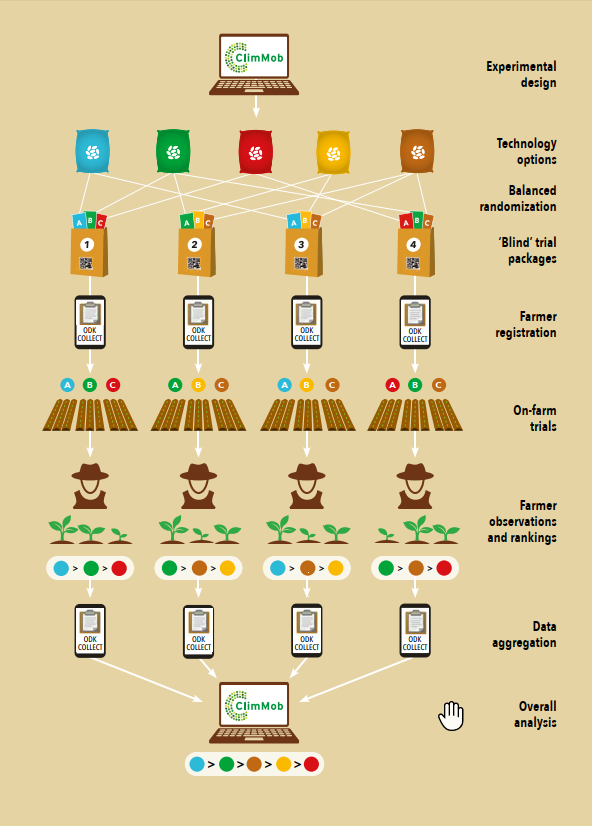
ClimMob is built using Component-Based Software Engineering (CBSE). This allows for a flexible and modular platform that is easy to update and maintain.
ClimMob is based on robust, widely adopted open-source components, including:
- Open Data Kit (ODK)
- ODK Tools
- PyUtilib Component Architecture
All data analysis is conducted through R packages, ensuring reproducibility and transparency.
User-centered development
From the beginning, ClimMob has followed an iterative and user-centered development process, marked by:
- Ongoing feedback from users
- Short communication loops between developers and field teams
- Continuous improvements based on real-world use
This has resulted in a platform that adapts to the evolving needs of agricultural innovation projects.
Who uses ClimMob—and how?
ClimMob was built to support a range of users within participatory testing projects:
-
Implementers (project leaders) - They benefit from tools for project setup, assigning field agents, and managing test packages. ClimMob also offers automatic statistical reports, enabling data-informed decision-making.
-
Field agents - They register participants and collect data using the ODK Collect app. This ensures data entry is quick, efficient, and synchronized with ClimMob.
-
Testers (participants) - They receive their test results soon after data submission. This rapid feedback helps them learn from peers and adopt the most promising technologies.
What’s next for ClimMob?
Ongoing development of ClimMob focuses on:
- Improving user experience (UI/UX)
- Expanding data types and media (e.g. audio, photos, sensor data)
- Enhancing integration with other platforms
- Strengthening support for data-driven agricultural decision-making
Create a ClimMob account
Create your personal account on ClimMob. If you have already registered an account, you can log in straight away.
How-to:
Visit the ClimMob online software.
On the left upper corner, click on Login or register an account.
If you already have an account, enter your username and password and click on Login (green button).
If you don't have an account, click on Create an account (white button) which you will find under Login.
-
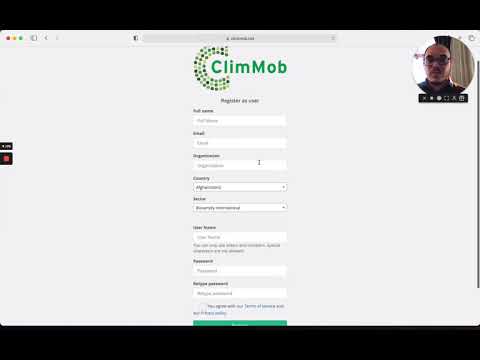
Fill in all the requested fields:
a. Full name: your name and surname
b. Email: your email address c. Organization: the organization you are working for, e.g. Alliance Bioversity – CIAT
d. Country: select your country from the drop-down menu
e. Sector: select the type of sector you are working for from the drop-down menu
f. Username: the name you will use to enter the ClimMob dashboard
g. Password: the password you will use to enter the ClimMob dashboard
h. Retype password: retype the password you have entered above
i. Agree with our Terms of service and our Privacy Policy
j. Finally, click on register and your account will be set
Video tutorial - Create an account
Get familiar with ClimMob
When users log into ClimMob for the first time, they are welcomed with a guided setup designed to help them configure the platform before creating their first project. This workflow ensures that key components are defined early, streamlining future project setup.
Navigate the main menu
The main menu is located on the left side of the screen and gives access to key areas of the platform, including your projects, library items, and tools.
Here is the order in which these onboarding messages appear:
Project Overview
The Project overview is the central workspace for managing a project in ClimMob. From this page, you can access the different project activities throughout the project life cycle, including project configuration, participant registration, trial package preparation, data collection, downloads, project documentation, and collaboration features.
Most project activities described in this ebook are accessed from the Project overview, while reusable resources such as field agents, technologies, questions and local languages are managed through the Library.
The Project overview also supports project monitoring throughout the project lifecycle. The Monitoring your project section explains how to use this workspace to review project progress and access key project information.
Projects
The Projects section displays all projects that you own or collaborate on.
The All projects table provides an overview of your projects and allows you to quickly identify their status, access project details, and perform available actions. This section is particularly useful when managing multiple projects simultaneously.
Library
The Library contains reusable elements that can be shared across multiple projects. Instead of creating the same resources every time you start a new project, ClimMob stores them in the Library so they can be managed consistently and reused whenever needed.
- Field agents: are the individuals responsible for registering participants and collecting data in the field. Once created, they can be assigned to multiple projects. * Technologies: represent the interventions being evaluated (for example, bean varieties, fertilizer regimes, or planting methods). Each technology contains one or more technology options, which can be assigned to projects and reused across multiple experiments.
- Questions: ClimMob provides a library of evaluation questions developed by the 1000FARMS team, available in multiple languages and ready to use across projects. You can also create your own questions, which are stored in the Library and can be reused in future projects.
- Local languages: support multilingual data collection by allowing ClimMob forms to be translated and used in different languages. This includes translated questions available from the Library, translation tools for custom questions, and common phrases used in data collection forms.
Downloads
This menu option gives access to tools and resources needed for field implementation, including:
- Field data collection templates
- Survey forms
- ClimMob documentation
- R analysis tools